Metrics & Semantic Models
Metrics & Semantic Models is currently in Beta. The underlying entity model is stable, but the UI experience, lineage visualization, and ingestion coverage are actively evolving. Expect ongoing improvements to sidebar navigation, entity page layouts, and lineage rendering across the next few releases.
This guide covers what Metrics & Semantic Models are and how to turn them on. For opinionated patterns on how to model your business concepts in them — when to use a Glossary Term vs a Metric, how to represent the same KPI across Snowflake and dbt, how metric lineage works end to end — see Metrics & Semantic Models — Best Practices.
Why Use Metrics & Semantic Models?
DataHub Metrics is a catalog for metric definitions, transforming how your team documents, discovers, and governs business measurements:
- Single source of truth for definitions — End the "which revenue number is right?" debate by cataloging each metric once, with its owner, description, calculation, and dimensional context.
- Lineage from KPI to source and consumers — Trace every metric through the logical datasets it reads down to the physical tables and columns that feed it, and out to the Charts, Dashboards, and Datasets that consume it.
- AI-ready context — Attach synonyms, natural-language instructions, and example questions to every metric so agents and Ask DataHub can resolve natural language questions against cataloged definitions instead of guessing.
- Governed like everything else — Metrics and Semantic Models are full DataHub entities: owners, domains, tags, glossary terms, structured properties, and documentation all attach to them the same way they attach to Datasets.
- Portable, tool-agnostic model — The model is designed to accept metrics from any semantic layer (Snowflake Semantic Views and dbt today, Cube and MicroStrategy in alpha; Databricks metric views and more BI-tool metrics on the roadmap), so investing in the catalog is not a bet on one tool. Field-level overlap with Apache Ossie is documented separately.
What's Included
Two new entity types ship with this feature:
Semantic Model
A Semantic Model defines a group of datasets, how those datasets relate to one another (i.e. allowed join patterns), and which dimensions and metrics can be derived from those datasets. It serves as the backing dimensional context for the metrics calculated over it.
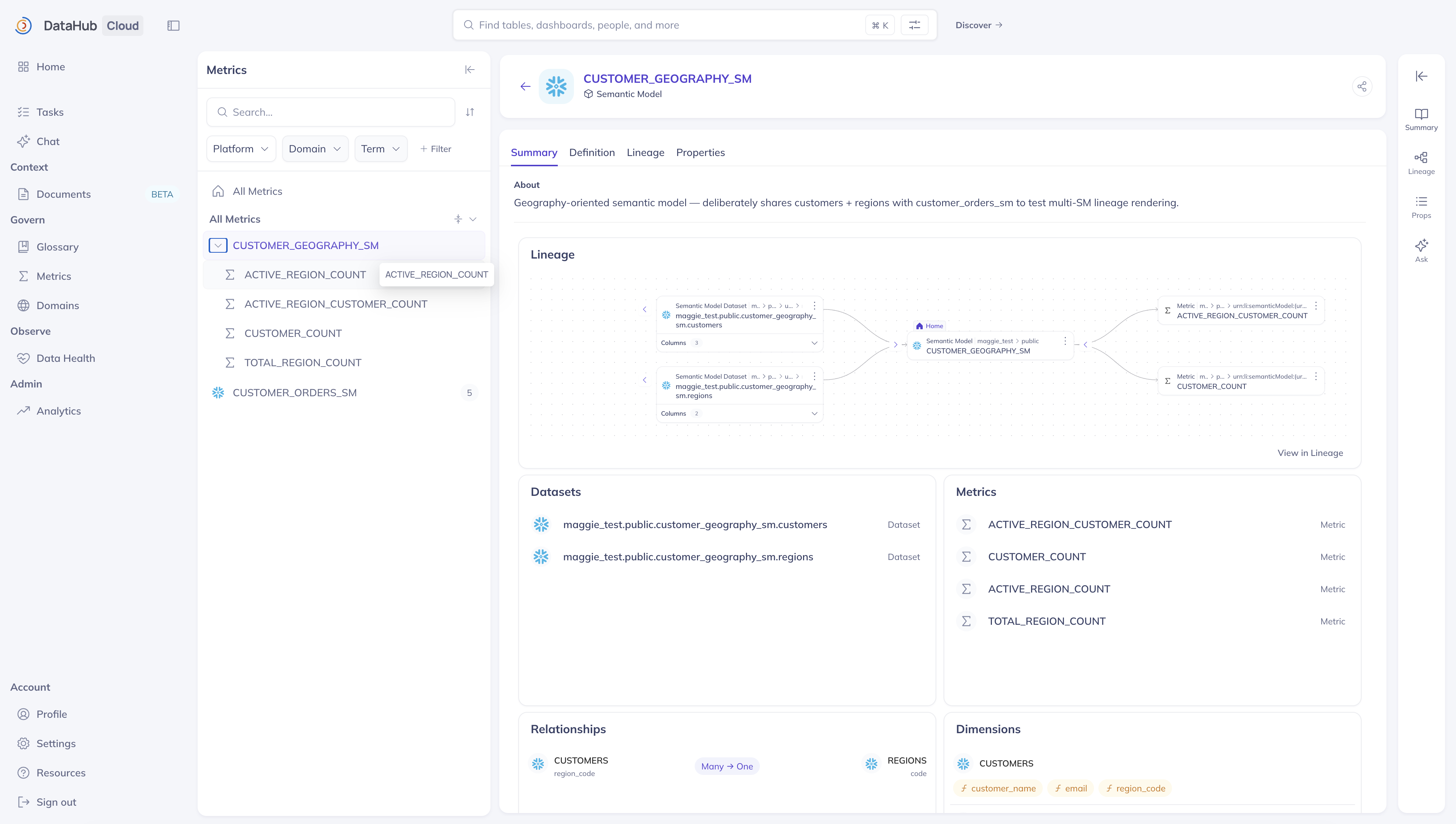
Each Semantic Model page includes:
- Governance — name, description, owners, domain, tags, structured properties, and glossary terms.
- Datasets — the logical datasets exposed by the model (each a full-featured DataHub Dataset with the
Semantic Model Datasetsubtype). - Relationships — join paths between the model's logical datasets, with cardinality and optional AI-context hints.
- Related Metrics — every metric backed by this model.
- Definition — the source-platform DDL / YAML (e.g. the Snowflake
CREATE SEMANTIC VIEWstatement) preserved verbatim for round-tripping and debugging. - AI Context — synonyms, natural-language instructions, few-shot examples for LLM-assisted exploration.
- Lineage — a bounding box around the model's member datasets and metrics. Hops go through those members (and their physical / BI neighbors), not through the Semantic Model itself.
Metric
A Metric explicitly defines the SQL calculation of a named business measurement — total_revenue, daily_active_users, conversion_rate — and optionally carries AI Context to help agents understand synonyms, example questions the metric should answer, and sample queries.
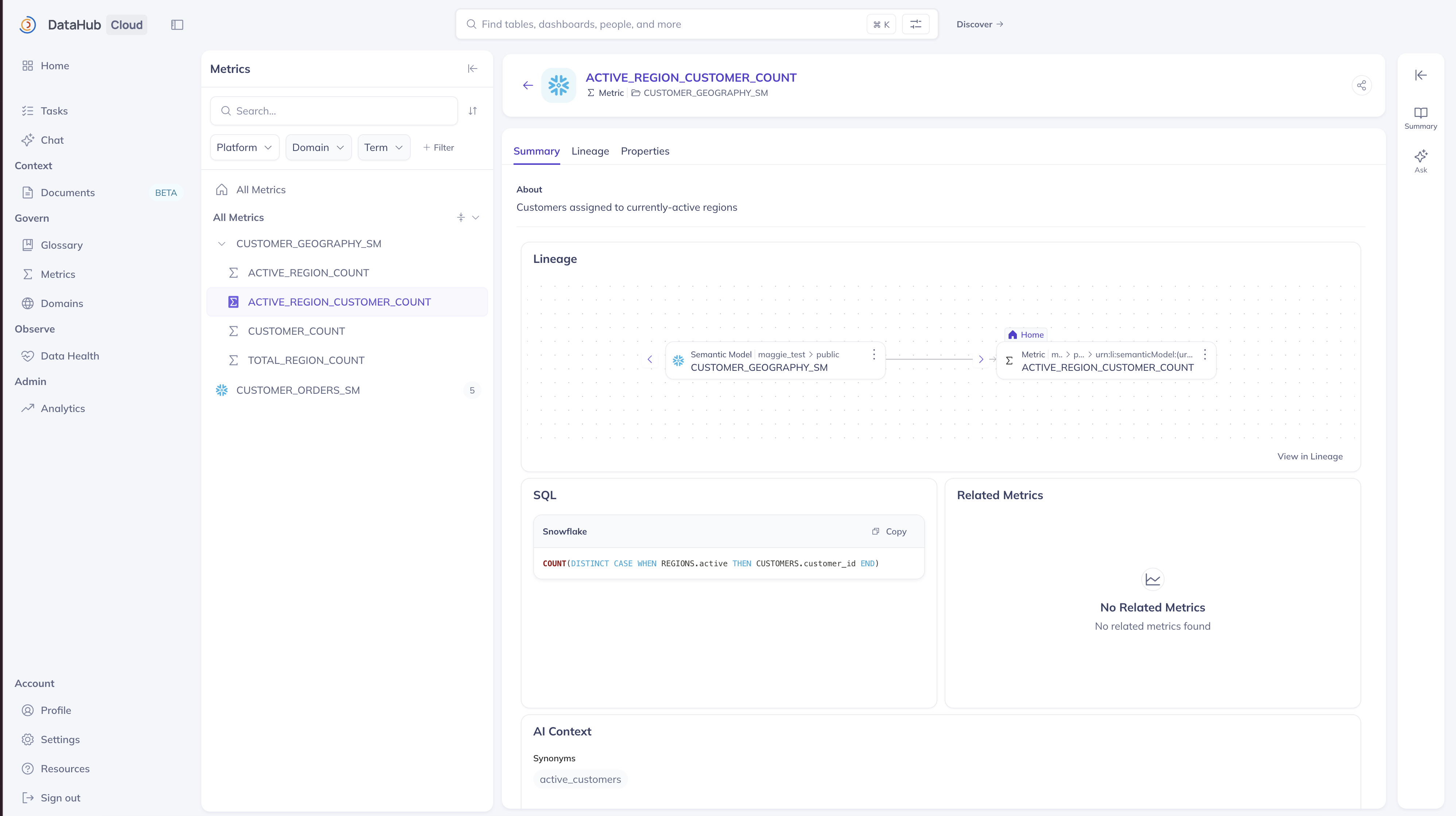
Each Metric page includes:
- Expression — the SQL that computes the metric, in one or more dialects (
ANSI_SQL,SNOWFLAKE,MDX,TABLEAU,DATABRICKS,MAQL,OTHER). - Semantic Model — the model this metric is calculated within.
- Derived From / Related Metrics — parent metrics and semantic peers (e.g.
revenue_per_customerderived fromtotal_revenueandcustomer_count). - AI Context — synonyms (
revenue,topline,gross), instructions, sample questions. - Governance — name, description, owners, domain, tags, structured properties, and glossary terms.
- Lineage — upstream to the logical and physical datasets the metric reads; downstream to Charts, Dashboards, and Datasets that consume it. The Semantic Model is a bounding box around its members, not a hop in the chain.
Semantic Model Datasets
Every logical dataset a Semantic Model exposes is itself a full Dataset entity, subtyped Semantic Model Dataset. That means each logical dataset gets its own schema, its own governance surface, its own lineage graph, and its own search results — exactly like dbt Sources, Looker Views, and Snowflake Dynamic Tables.
Each field carries a semantic annotation identifying it as a DIMENSION (grouping / filtering attribute), MEASURE (aggregatable numeric value), or FILTER (named boolean predicate), plus its underlying SQL expression and — for measures — the aggregation function.
Prerequisites
For DataHub Cloud customers: Metrics & Semantic Models require DataHub Cloud 2.1.0 or later. The feature is on by default from 2.3.0; reach out to your DataHub representative if you need it turned off for your organization.
For DataHub Core (OSS) deployments: Available in DataHub Core v1.7.0 or later. The feature is on by default from v1.8.0. To hide Metrics from the UI, set METRICS_ENABLED=false on the GMS service.
Verify the flag via the GraphQL app-config query:
{
  appConfig {
    featureFlags {
      metricsEnabled
    }
  }
}
The Metrics section appears in the left navigation sidebar with a Beta badge.
Ingesting Metrics
From Snowflake Semantic Views
DataHub's Snowflake connector emits Semantic Models and Metrics directly from Snowflake Semantic Views.
Enable in the Snowflake recipe:
source:
  type: snowflake
  config:
    account_id: ...
    username: ...
    include_technical_schema: true

    semantic_views:
      enabled: true # ingest Semantic Views at all
      emit_semantic_model_entities: null # tri-state — see below
      column_lineage: true # physical→logical column lineage
The emit_semantic_model_entities control is tri-state:
| Value | Behavior |
|---|---|
null (default) | Auto-detect. On DataHub Cloud ≥ 2.1.0 with Metrics enabled, emits SM/Metric entities. Elsewhere (older Cloud, OSS/self-hosted without an explicit opt-in, or connectionless runs) falls back to legacy Semantic View datasets. |
true | Request SM/Metric emission. Honored on Cloud when the server + flag support it; on OSS, requires the operator to run a server that registers these entities. |
false | Force legacy Semantic View dataset behavior even if the server supports the new entities. |
Snowflake Semantic Views are a native Snowflake capability. If you also use the Cortex Analyst integration on top of Semantic Views, that integration is gated to Snowflake Enterprise Edition and above — cataloging the Semantic Views into DataHub does not depend on Cortex.
From Cube and MicroStrategy
The Cube and MicroStrategy sources can also emit Semantic Models and Metrics. Set emit_semantic_model_entities: true in the recipe. Both are in alpha.
From the DataHub Python SDK
Emit metrics and semantic models programmatically from any script or connector using the high-level SDK builders (datahub.sdk.SemanticModel, .Metric, and .SemanticModelDataset):
from datahub.sdk import (
    DataHubClient,
    DialectExpressionInput,
    Metric,
    SemanticModel,
)

client = DataHubClient(server="...", token="...")

model = SemanticModel(
    platform="snowflake",
    path="analytics",
    id="orders_model",
    name="Orders Model",
    description="Sales analytics semantic model",
    datasets=[...],
    relationships=[...],
)

metric = Metric(
    platform="snowflake",
    path="analytics.orders_model",
    id="total_revenue",
    name="Total Revenue",
    description="Sum of order amounts.",
    semantic_model=model.urn,
    expression=DialectExpressionInput(
        dialect="SNOWFLAKE",
        expression="SUM(orders.amount)",
    ),
)

for mcp in [*model.as_mcps(), *metric.as_mcps()]:
    client.entities.upsert(mcp)
Full tutorial and reference: Semantic Models & Metrics SDK Guide.
Exploring Metrics
Browse
The Metrics left-nav item opens /metrics, a landing page with a browse tree grouped by Semantic Model. Expand a model to see the metrics it backs. Filter and sort by owner, domain, tag, and platform.
Search
Metrics and Semantic Models appear in global Search and the search-bar autocomplete. Search by display name, description, or platform; use the Type filter to narrow to Metrics or Semantic Models. The dedicated /metrics browse tree remains the best way to explore metrics grouped by Semantic Model. Browse V2 does not list these entity types — use Search or /metrics instead.
Lineage
A Metric's Lineage tab shows the datasets it reads (and their physical sources) on the upstream side, and the Charts, Dashboards, and Datasets that consume it on the downstream side. Derived metrics appear as Metric-to-Metric hops.
The Semantic Model is a bounding box around its member datasets and metrics — it groups them visually, but it is not itself a hop in the lineage graph. Opening a Semantic Model's Lineage tab draws those members inside the box; expanding a member reveals its physical and BI neighbors.
Impact Analysis works in both directions at the entity level. Column-level impact analysis (a physical column to every downstream metric field) is still on the roadmap.
Governance
Metrics and Semantic Models reuse DataHub's standard governance surface:
- Owners — assign ownership by user, group, or role.
- Domains — group metrics under business domains (Sales, Marketing, Finance, etc.).
- Tags & Glossary terms — apply the same taxonomy you use for datasets.
Certified,Deprecated, and PII tags work as expected. - Structured properties — extend the model with typed metadata (metric additivity, metric kind, measure shape, etc.).
- Documentation & links — long-form docs and institutional memory.
AI Context
Every Semantic Model, Metric, and semantic-annotated field can carry an AI Context record:
- Synonyms — alternate names the metric is known by (
ARPU↔revenue_per_customer). - Instructions — natural-language guidance for LLMs interpreting or querying the metric.
- Examples — sample questions or SQL snippets showing the metric in action.
- Custom instructions — arbitrary structured hints.
Future releases will ensure AI Context feeds directly into Ask DataHub and any agent grounded on your catalog, so metric definitions become resolvable by natural-language reference rather than URN.
What's Coming Next
We're actively investing in the Metrics experience. Near-term work includes:
- Metrics & Semantic Models via DataHub MCP so agents can retrieve them during agentic workflows.
- Additional ingestion sources. Expanding beyond Snowflake Semantic Views and dbt to cover Databricks Unity Catalog metric views, Sigma, and BI-tool measures.
- Column-level lineage from source columns through to metrics. Full column-to-metric impact analysis — see which KPIs are affected by a change to a raw column.
- Lineage visualization improvements. Cleaner node labels, collapsed intermediate nodes, and a Semantic Model container view that reduces graph noise.
- AI-native discovery. Ask DataHub resolving natural-language questions to cataloged metric definitions using synonyms and expression-aware SQL.
FAQ
Can DataHub query my metric values? No. DataHub is a catalog for metric definitions — the calculation, dimensional context, lineage, and governance. Value computation and visualization stay in your BI tool or semantic layer.
Do I need Snowflake to use Metrics? No. The Python SDK lets you emit Semantic Models and Metrics from any source. Snowflake Semantic Views is the first turnkey ingestion path; more are in progress.
What happens to my existing Snowflake Semantic Views ingested before this feature launched?
They stay in DataHub as legacy Semantic View datasets. When you're ready to move to the new model, the datahub migrate snowflake-semantic-views CLI copies governance (owners, domains, tags, glossary terms, documentation, deprecation, applications, column-level tags/terms) onto the new Semantic Model and Metric URNs. The migration is not automatic — reach out to your DataHub representative to plan the cutover. Lineage and policies are not migrated by the CLI; run Snowflake ingestion with emit_semantic_model_entities: true afterward to fill structural aspects.
Are metrics environment-specific?
No. Metric URNs deliberately omit the environment qualifier (PROD, STAGING, etc.) — total_revenue in PROD and STAGING resolve to the same metric entity. Cross-platform metrics (e.g. the same measure defined in both dbt and Snowflake) remain distinct because the platform is encoded in the URN.
Can I add custom properties (e.g. additivity, measure shape) to metrics? Yes. Metrics support Structured Properties — typed, governance-controlled, search-facet-enabled custom fields. Use them for platform-specific metadata that does not yet warrant a first-class schema field.
Related
- Metrics & Semantic Models — Best Practices — opinionated modeling patterns, how to represent cross-platform metrics, and how metric lineage works end to end
- Semantic Models & Metrics SDK Tutorial