Azure AD
Overview
Microsoft Entra ID is an identity and access management platform. Learn more in the official Microsoft Entra ID documentation.
The DataHub integration for Microsoft Entra ID covers identity entities such as users, groups, and memberships. It also captures stateful deletion detection.
Concept Mapping
While the specific concept mapping is still pending, this shows the generic concept mapping in DataHub.
| Source Concept | DataHub Concept | Notes |
|---|---|---|
| Ownership and collaboration principals | CorpUser, CorpGroup | Emitted by modules that support ownership and identity metadata. |
Module azure-ad

Important Capabilities
| Capability | Status | Notes |
|---|---|---|
| Detect Deleted Entities | ✅ | Enabled by default via stateful ingestion. |
Overview
The azure-ad module ingests metadata from Azure Ad into DataHub. It is intended for production ingestion workflows and module-specific capabilities are documented below.
Prerequisites
Before running ingestion, ensure network connectivity to the source, valid authentication credentials, and read permissions for metadata APIs required by this module.
Required Azure AD Application Permissions
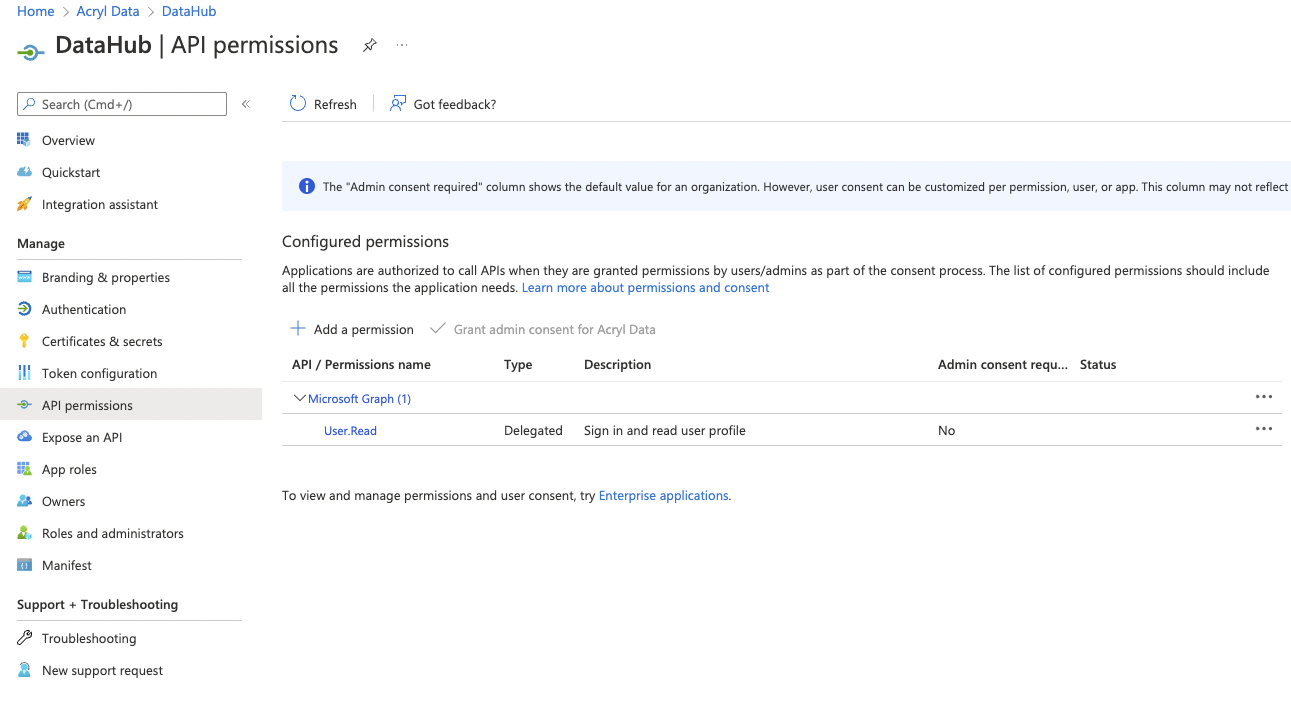
Create a DataHub application in the Azure AD portal and grant these Application permissions:
Group.Read.AllGroupMember.Read.AllUser.Read.All
You can add permissions in the API permissions tab of your application configuration.
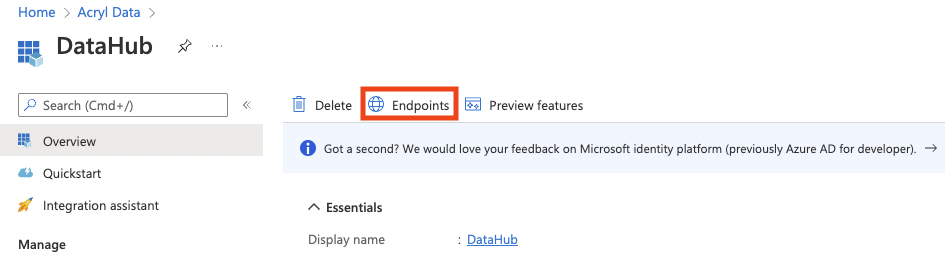
You can verify required endpoint values from the Endpoints action in the application overview.
SSO Caveat
Users ingested from this connector will only be able to log in to DataHub if Okta OIDC SSO is configured in your DataHub deployment.
Install the Plugin
pip install 'acryl-datahub[azure-ad]'
Starter Recipe
Check out the following recipe to get started with ingestion! See below for full configuration options.
For general pointers on writing and running a recipe, see our main recipe guide.
source:
  type: "azure-ad"
  config:
    client_id: "00000000-0000-0000-0000-000000000000"
    tenant_id: "00000000-0000-0000-0000-000000000000"
    client_secret: "xxxxx"
    redirect: "https://login.microsoftonline.com/common/oauth2/nativeclient"
    authority: "https://login.microsoftonline.com/00000000-0000-0000-0000-000000000000"
    token_url: "https://login.microsoftonline.com/00000000-0000-0000-0000-000000000000/oauth2/token"
    graph_url: "https://graph.microsoft.com/v1.0"
    ingest_users: True
    ingest_groups: True
    groups_pattern:
      allow:
        - ".*"
    users_pattern:
      allow:
        - ".*"

sink:
  # sink configs
Config Details
- Options
- Schema
Note that a . is used to denote nested fields in the YAML recipe.
| Field | Description |
|---|---|
authority ✅ string | The authority (https://docs.microsoft.com/en-us/azure/active-directory/develop/msal-client-application-configuration) is a URL that indicates a directory that MSAL can request tokens from. |
client_id ✅ string | Application ID. Found in your app registration on Azure AD Portal |
client_secret ✅ string(password) | Client secret. Found in your app registration on Azure AD Portal |
tenant_id ✅ string | Directory ID. Found in your app registration on Azure AD Portal |
token_url ✅ string | The token URL that acquires a token from Azure AD for authorizing requests. This source will only work with v1.0 endpoint. |
azure_ad_response_to_groupname_attr string | Which Azure AD Group Response attribute to use as input to DataHub group name mapping. Default: displayName |
azure_ad_response_to_groupname_regex string | A regex used to parse the DataHub group name from the attribute specified in azure_ad_response_to_groupname_attr. Default: (.*) |
azure_ad_response_to_username_attr string | Which Azure AD User Response attribute to use as input to DataHub username mapping. Default: userPrincipalName |
azure_ad_response_to_username_regex string | A regex used to parse the DataHub username from the attribute specified in azure_ad_response_to_username_attr. Default: (.*) |
graph_url string | Microsoft Graph API endpoint Default: https://graph.microsoft.com/v1.0 |
ingest_group_membership boolean | Whether group membership should be ingested into DataHub. ingest_groups must be True if this is True. Default: True |
ingest_groups boolean | Whether groups should be ingested into DataHub. Default: True |
ingest_groups_users boolean | This option is useful only when ingest_users is set to False and ingest_group_membership to True. As effect, only the users which belongs to the selected groups will be ingested. Default: True |
ingest_users boolean | Whether users should be ingested into DataHub. Default: True |
mask_group_id boolean | Whether workunit ID's for groups should be masked to avoid leaking sensitive information. Default: True |
mask_user_id boolean | Whether workunit ID's for users should be masked to avoid leaking sensitive information. Default: True |
platform_instance One of string, null | The instance of the platform that all assets produced by this recipe belong to. This should be unique within the platform. See https://docs.datahub.com/docs/platform-instances/ for more details. Default: None |
redirect string | Redirect URI. Found in your app registration on Azure AD Portal. |
env string | The environment that all assets produced by this connector belong to Default: PROD |
groups_pattern AllowDenyPattern | A class to store allow deny regexes. Patterns are matched against the start of the string only, not the entire string - a pattern does not need to match to the end to be considered a match. For example, the pattern "prod" matches "prod", "prod_east", and "production". To require an exact match, anchor your pattern explicitly, e.g. "^prod$". |
groups_pattern.ignoreCase One of boolean, null | Whether to ignore case sensitivity during pattern matching. Default: True |
users_pattern AllowDenyPattern | A class to store allow deny regexes. Patterns are matched against the start of the string only, not the entire string - a pattern does not need to match to the end to be considered a match. For example, the pattern "prod" matches "prod", "prod_east", and "production". To require an exact match, anchor your pattern explicitly, e.g. "^prod$". |
users_pattern.ignoreCase One of boolean, null | Whether to ignore case sensitivity during pattern matching. Default: True |
stateful_ingestion One of StatefulStaleMetadataRemovalConfig, null | Azure AD Stateful Ingestion Config. Default: None |
stateful_ingestion.enabled boolean | Whether or not to enable stateful ingest. Default: True if a pipeline_name is set and either a datahub-rest sink or datahub_api is specified, otherwise False Default: False |
stateful_ingestion.fail_safe_threshold number | Prevents large amount of soft deletes & the state from committing from accidental changes to the source configuration if the relative change percent in entities compared to the previous state is above the 'fail_safe_threshold'. Default: 75.0 |
stateful_ingestion.remove_stale_metadata boolean | Soft-deletes the entities present in the last successful run but missing in the current run with stateful_ingestion enabled. Default: True |
The JSONSchema for this configuration is inlined below.
{
  "$defs": {
    "AllowDenyPattern": {
      "additionalProperties": false,
      "description": "A class to store allow deny regexes.\n\nPatterns are matched against the start of the string only, not the entire\nstring - a pattern does not need to match to the end to be considered a match.\nFor example, the pattern \"prod\" matches \"prod\", \"prod_east\", and \"production\".\nTo require an exact match, anchor your pattern explicitly, e.g. \"^prod$\".",
      "properties": {
        "allow": {
          "default": [
            ".*"
          ],
          "description": "List of regex patterns to include in ingestion. Patterns match from the start of the string only, not the entire string - anchor with '^...$' for an exact match, e.g. '^prod$'.",
          "items": {
            "type": "string"
          },
          "title": "Allow",
          "type": "array"
        },
        "deny": {
          "default": [],
          "description": "List of regex patterns to exclude from ingestion. Patterns match from the start of the string only, not the entire string - anchor with '^...$' for an exact match, e.g. '^prod$'.",
          "items": {
            "type": "string"
          },
          "title": "Deny",
          "type": "array"
        },
        "ignoreCase": {
          "anyOf": [
            {
              "type": "boolean"
            },
            {
              "type": "null"
            }
          ],
          "default": true,
          "description": "Whether to ignore case sensitivity during pattern matching.",
          "title": "Ignorecase"
        }
      },
      "title": "AllowDenyPattern",
      "type": "object"
    },
    "StatefulStaleMetadataRemovalConfig": {
      "additionalProperties": false,
      "description": "Base specialized config for Stateful Ingestion with stale metadata removal capability.",
      "properties": {
        "enabled": {
          "default": false,
          "description": "Whether or not to enable stateful ingest. Default: True if a pipeline_name is set and either a datahub-rest sink or `datahub_api` is specified, otherwise False",
          "title": "Enabled",
          "type": "boolean"
        },
        "remove_stale_metadata": {
          "default": true,
          "description": "Soft-deletes the entities present in the last successful run but missing in the current run with stateful_ingestion enabled.",
          "title": "Remove Stale Metadata",
          "type": "boolean"
        },
        "fail_safe_threshold": {
          "default": 75.0,
          "description": "Prevents large amount of soft deletes & the state from committing from accidental changes to the source configuration if the relative change percent in entities compared to the previous state is above the 'fail_safe_threshold'.",
          "maximum": 100.0,
          "minimum": 0.0,
          "title": "Fail Safe Threshold",
          "type": "number"
        }
      },
      "title": "StatefulStaleMetadataRemovalConfig",
      "type": "object"
    }
  },
  "additionalProperties": false,
  "description": "Config to create a token and connect to Azure AD instance",
  "properties": {
    "env": {
      "default": "PROD",
      "description": "The environment that all assets produced by this connector belong to",
      "title": "Env",
      "type": "string"
    },
    "platform_instance": {
      "anyOf": [
        {
          "type": "string"
        },
        {
          "type": "null"
        }
      ],
      "default": null,
      "description": "The instance of the platform that all assets produced by this recipe belong to. This should be unique within the platform. See https://docs.datahub.com/docs/platform-instances/ for more details.",
      "title": "Platform Instance"
    },
    "stateful_ingestion": {
      "anyOf": [
        {
          "$ref": "#/$defs/StatefulStaleMetadataRemovalConfig"
        },
        {
          "type": "null"
        }
      ],
      "default": null,
      "description": "Azure AD Stateful Ingestion Config."
    },
    "client_id": {
      "description": "Application ID. Found in your app registration on Azure AD Portal",
      "title": "Client Id",
      "type": "string"
    },
    "tenant_id": {
      "description": "Directory ID. Found in your app registration on Azure AD Portal",
      "title": "Tenant Id",
      "type": "string"
    },
    "client_secret": {
      "description": "Client secret. Found in your app registration on Azure AD Portal",
      "format": "password",
      "title": "Client Secret",
      "type": "string",
      "writeOnly": true
    },
    "authority": {
      "description": "The authority (https://docs.microsoft.com/en-us/azure/active-directory/develop/msal-client-application-configuration) is a URL that indicates a directory that MSAL can request tokens from.",
      "title": "Authority",
      "type": "string"
    },
    "token_url": {
      "description": "The token URL that acquires a token from Azure AD for authorizing requests.  This source will only work with v1.0 endpoint.",
      "title": "Token Url",
      "type": "string"
    },
    "redirect": {
      "default": "https://login.microsoftonline.com/common/oauth2/nativeclient",
      "description": "Redirect URI.  Found in your app registration on Azure AD Portal.",
      "title": "Redirect",
      "type": "string"
    },
    "graph_url": {
      "default": "https://graph.microsoft.com/v1.0",
      "description": "[Microsoft Graph API endpoint](https://docs.microsoft.com/en-us/graph/use-the-api)",
      "title": "Graph Url",
      "type": "string"
    },
    "azure_ad_response_to_username_attr": {
      "default": "userPrincipalName",
      "description": "Which Azure AD User Response attribute to use as input to DataHub username mapping.",
      "title": "Azure Ad Response To Username Attr",
      "type": "string"
    },
    "azure_ad_response_to_username_regex": {
      "default": "(.*)",
      "description": "A regex used to parse the DataHub username from the attribute specified in `azure_ad_response_to_username_attr`.",
      "title": "Azure Ad Response To Username Regex",
      "type": "string"
    },
    "azure_ad_response_to_groupname_attr": {
      "default": "displayName",
      "description": "Which Azure AD Group Response attribute to use as input to DataHub group name mapping.",
      "title": "Azure Ad Response To Groupname Attr",
      "type": "string"
    },
    "azure_ad_response_to_groupname_regex": {
      "default": "(.*)",
      "description": "A regex used to parse the DataHub group name from the attribute specified in `azure_ad_response_to_groupname_attr`.",
      "title": "Azure Ad Response To Groupname Regex",
      "type": "string"
    },
    "ingest_users": {
      "default": true,
      "description": "Whether users should be ingested into DataHub.",
      "title": "Ingest Users",
      "type": "boolean"
    },
    "ingest_groups": {
      "default": true,
      "description": "Whether groups should be ingested into DataHub.",
      "title": "Ingest Groups",
      "type": "boolean"
    },
    "ingest_group_membership": {
      "default": true,
      "description": "Whether group membership should be ingested into DataHub. ingest_groups must be True if this is True.",
      "title": "Ingest Group Membership",
      "type": "boolean"
    },
    "ingest_groups_users": {
      "default": true,
      "description": "This option is useful only when `ingest_users` is set to False and `ingest_group_membership` to True. As effect, only the users which belongs to the selected groups will be ingested.",
      "title": "Ingest Groups Users",
      "type": "boolean"
    },
    "users_pattern": {
      "$ref": "#/$defs/AllowDenyPattern",
      "default": {
        "allow": [
          ".*"
        ],
        "deny": [],
        "ignoreCase": true
      },
      "description": "regex patterns for users to filter in ingestion."
    },
    "groups_pattern": {
      "$ref": "#/$defs/AllowDenyPattern",
      "default": {
        "allow": [
          ".*"
        ],
        "deny": [],
        "ignoreCase": true
      },
      "description": "regex patterns for groups to include in ingestion."
    },
    "mask_group_id": {
      "default": true,
      "description": "Whether workunit ID's for groups should be masked to avoid leaking sensitive information.",
      "title": "Mask Group Id",
      "type": "boolean"
    },
    "mask_user_id": {
      "default": true,
      "description": "Whether workunit ID's for users should be masked to avoid leaking sensitive information.",
      "title": "Mask User Id",
      "type": "boolean"
    }
  },
  "required": [
    "client_id",
    "tenant_id",
    "client_secret",
    "authority",
    "token_url"
  ],
  "title": "AzureADConfig",
  "type": "object"
}
As a prerequisite, you should create a DataHub Application within the Azure AD Portal with the permissions
to read your organization's Users and Groups. The following permissions are required, with the Application permission type:
Group.Read.AllGroupMember.Read.AllUser.Read.All
You can add a permission by navigating to the permissions tab in your DataHub application on the Azure AD portal.
You can view the necessary endpoints to configure by clicking on the Endpoints button in the Overview tab.
Capabilities
Use the Important Capabilities table above as the source of truth for supported features and whether additional configuration is required.
Extracting DataHub Users
Usernames
Usernames serve as unique identifiers for users on DataHub. This connector extracts usernames using the "userPrincipalName" field of an Azure AD User Response, which is the unique identifier for your Azure AD users.
If this is not how you wish to map to DataHub usernames, you can provide a custom mapping using the configurations options detailed below. Namely, azure_ad_response_to_username_attr
and azure_ad_response_to_username_regex.
Responses
This connector also extracts basic user response information from Azure. The following fields of the Azure User Response are extracted
and mapped to the DataHub CorpUserInfo aspect:
- display name
- first name
- last name
- title
- country
This connector emits both corpUserInfo.active and the corpUserStatus aspect for each user. Azure AD accountEnabled: false maps to DataHub SUSPENDED (and active: false); enabled or missing values map to ACTIVE (and active: true).
Extracting DataHub Groups
Group Names
Group names serve as unique identifiers for groups on DataHub. This connector extracts group names using the "name" attribute of an Azure Group Response. By default, a URL-encoded version of the full group name is used as the unique identifier (CorpGroupKey) and the raw "name" attribute is mapped as the display name that will appear in DataHub's UI.
If this is not how you wish to map to DataHub group names, you can provide a custom mapping using the configurations options detailed below. Namely, azure_ad_response_to_groupname_attr
and azure_ad_response_to_groupname_regex.
Responses
This connector also extracts basic group information from Azure. The following fields of the Azure AD Group Response are extracted and mapped to the
DataHub CorpGroupInfo aspect:
- name
- description
Extracting Group Membership
This connector additional extracts the edges between Users and Groups that are stored in Azure AD. It maps them to the GroupMembership aspect
associated with DataHub users (CorpUsers).
Limitations
Module behavior is constrained by source APIs, permissions, and metadata exposed by the platform. Refer to capability notes for unsupported or conditional features.
Troubleshooting
If ingestion fails, validate credentials, permissions, connectivity, and scope filters first. Then review ingestion logs for source-specific errors and adjust configuration accordingly.
Code Coordinates
- Class Name:
datahub.ingestion.source.identity.azure_ad.AzureADSource - Browse on GitHub
If you've got any questions on configuring ingestion for Azure AD, feel free to ping us on our Slack.
This page is auto-generated from the underlying source code. To make changes, please edit the relevant source files in the metadata-ingestion directory.
Tip: For quick typo fixes or documentation updates, you can click the ✏️ Edit icon directly in the GitHub UI to open a Pull Request. For larger changes and PR naming conventions, please refer to our Contributing Guide.